

LibreModular-MCP
Universal MCP server written in Rust, with a Hub that exposes only two tools
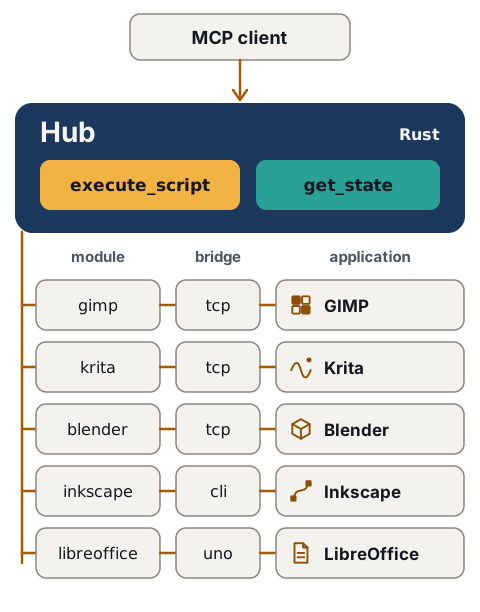
If a model drives a desktop application with one tool per gesture, every gesture is a round trip. The Hub exposes two tools: one script does the whole job in one call. GIMP, Krita, Blender, Inkscape and LibreOffice work today, each through a module and a bridge; the Hub is built for as many applications as possible in one server.

A script sent, the Hub’s answer
This script draws a three-bar chart in an Inkscape document. A client sent it in one execute_script call, and the block under it is the Hub’s answer. The Demonstration gives a client of 25 lines and every step to replay a run like this one.
import json
import os

import inkex

document = inkex.load_svg(os.environ["LMM_DOCUMENT"])
layer = document.getroot().add(inkex.Layer.new("Chart"))
for index, value in enumerate([3, 7, 5]):
    layer.add(inkex.Rectangle.new(20 + index * 30, 100 - value * 10, 20, value * 10))
document.write(os.environ["LMM_DOCUMENT"])
print("LMM_RESULT: " + json.dumps({"bars": len(layer)})){
"app": "inkscape",
"duration_ms": 151,
"error": null,
"result": {
"bars": 3
},
"status": "ok",
"stderr": "",
"stdout": "",
"truncated": false
}Inkscape 1.4 ran it in the cli mode, with no window: the Hub started one Python process for the script and returned the value the script printed after LMM_RESULT: as result.
Two tools, one module per application
This is LibreModular-MCP. The Hub is one Rust binary that gives the model exactly two tools. execute_script runs a complete Python script in an application and returns what the script printed, its result, or the application’s own error trace. get_state returns what is open in the application. A module on the Hub side and a bridge on the application side reach GIMP, Krita, Blender, Inkscape and LibreOffice; the Hub itself knows none of their interfaces.
These five applications are the ones tried, not the scope of the Hub: another application is added through a module, a bridge and its guide, as CONTRIBUTING.md describes, and the code is MIT-licensed.
The Quickstart creates the configuration of the Hub, Connect your model declares it in Claude Code or in opencode, and Installation gives the package for each Linux family.
Where to go next
- Demonstration
A client of 25 lines starts the Hub, sends a script to Inkscape and prints each answer, with no MCP client and no window.
- Installation
One command per Linux family to install the Hub from its package, the Windows installer, the level each one reached, its checksum, and the build from the sources.
- Architecture
The Hub, its two tools, one module and one bridge per application, the three modes, and one script measured against separate calls.
- Security
What the Hub bounds, which risks remain, what leaves the machine, and the measurements replayed for this page.
- Compatibility
For each application, the version tried, the command that started it and what was not tried.
- Applications
One real recipe per application: the text given to a model, its script, the Hub's answers and the file produced.