LibreOffice
A model drives LibreOffice 25.2.3.2 through the Hub to build a sales sheet in Calc, with formulas and a header, from no open document, and save it as an .ods file. The first script worked. This page gives the text, the script, the Hub’s answers and the capture.

On this page
Start LibreOffice and its bridge
LibreOffice and its bridge never start on the model’s word: the operator starts both. One launcher does it, from the guide, and returns at once:
libremodular-launch libreoffice --bridge-file /usr/share/libremodular-mcp/bridges/uno_bridge.py
The run had no screen, so a virtual X server stood in for it, and it set the ports to 2102 and 9314 in config.toml, not the defaults 2002 and 9304. The launcher printed:
LibreOffice started (process 612876), listening for UNO on 127.0.0.1:2102
bridge started (process 612877), listening on 127.0.0.1:9314
a script runs on the current document of its target's family, or with doc set to None when none is open
stop the bridge with 'libremodular-launch libreoffice --stop'; LibreOffice is yours to close
LibreOffice listened for UNO 1.3 s after the launch, and the Hub was started after that. get_state on hub listed the three targets that share the bridge, libreoffice-writer, libreoffice-calc and libreoffice-impress, connected, with the version LibreOffice reported:
{
  "app": "hub",
  "app_version": "0.1.0",
  "bridge_version": null,
  "captured_at": "2026-10-21T12:48:38.198Z",
  "connected": true,
  "content_origin": "hub",
  "screenshot": null,
  "state": {
    "modules": [
      {
        "app_version": "25.2.3.2",
        "bridge_version": "1",
        "connected": true,
        "mode": "uno",
        "name": "libreoffice-writer"
      },
      {
        "app_version": "25.2.3.2",
        "bridge_version": "1",
        "connected": true,
        "mode": "uno",
        "name": "libreoffice-calc"
      },
      {
        "app_version": "25.2.3.2",
        "bridge_version": "1",
        "connected": true,
        "mode": "uno",
        "name": "libreoffice-impress"
      }
    ]
  },
  "warnings": []
}
Text given to the model
Before writing, the model called get_state on libreoffice-calc. active was null and documents was empty, with a warning that LibreOffice had no current Calc document. That is not an error: a script then runs with doc set to None and can create the first document.
Script written
A model, Claude Sonnet 5.5, wrote this script from the guide and from that state. It is not a script taken from the project’s tests. It creates the document when doc is None, and it saves with storeToURL inside the working directory.
import os

import uno

if doc is None:
    doc = desktop.loadComponentFromURL("private:factory/scalc", "_blank", 0, ())
sheet = doc.Sheets.getByIndex(0)
sheet.Name = "Sales"

header = ["Product", "Q1", "Q2", "Q3", "Q4", "Total"]
data = [("Tent", 120, 150, 310, 90), ("Stove", 80, 60, 140, 200), ("Lantern", 45, 70, 65, 120)]
for column, title in enumerate(header):
    cell = sheet.getCellByPosition(column, 0)
    cell.setString(title)
    cell.CharWeight = 150.0
    cell.CharColor = 0xFFFFFF
    cell.CellBackColor = 0x1C385C
    if column > 0:
        cell.HoriJustify = uno.Enum("com.sun.star.table.CellHoriJustify", "RIGHT")
for row, (name, *values) in enumerate(data, start=1):
    sheet.getCellByPosition(0, row).setString(name)
    for column, value in enumerate(values, start=1):
        sheet.getCellByPosition(column, row).setValue(value)
    sheet.getCellByPosition(5, row).setFormula(f"=SUM(B{row + 1}:E{row + 1})")
last = len(data) + 1
sheet.getCellByPosition(0, last).setString("Total")
for column in range(1, 6):
    letter = "ABCDEF"[column]
    sheet.getCellByPosition(column, last).setFormula(f"=SUM({letter}2:{letter}{last})")
for column in range(0, 6):
    sheet.getCellByPosition(column, last).CharWeight = 150.0
    sheet.Columns.getByIndex(column).Width = 2600

path = os.path.join(LMM_WORK_DIR, "sales.ods")
properties = (uno.createUnoStruct("com.sun.star.beans.PropertyValue"),)
properties[0].Name = "FilterName"
properties[0].Value = "calc8"
doc.storeToURL(uno.systemPathToFileUrl(path), properties)
result = {"sheet": sheet.Name, "grand_total": sheet.getCellByPosition(5, last).getValue(), "ods_bytes": os.path.getsize(path)}
The Hub’s answer
{
  "app": "libreoffice-calc",
  "duration_ms": 555,
  "error": null,
  "result": {
    "grand_total": 1450.0,
    "ods_bytes": 13472,
    "sheet": "Sales"
  },
  "status": "ok",
  "stderr": "",
  "stdout": "",
  "truncated": false
}
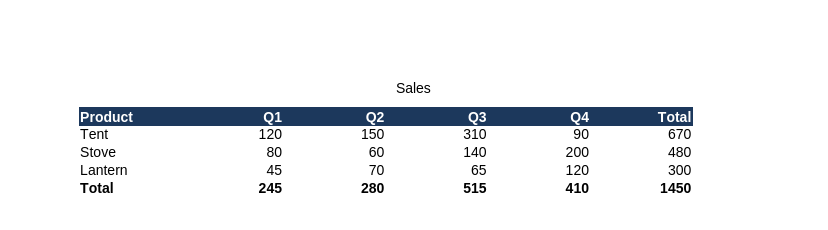
The grand total, computed by the formula, is 1 450: 670 for the tent, 480 for the stove and 300 for the lantern. The .ods file the script saved is 13 472 bytes. get_state then described the sheet and returned a capture:
{
  "app": "libreoffice-calc",
  "app_version": "25.2.3.2",
  "bridge_version": "1",
  "captured_at": "2026-10-21T12:48:39.480Z",
  "connected": true,
  "content_origin": "document",
  "screenshot": "$XDG_RUNTIME_DIR/libremodular-mcp/captures/libreoffice-calc-20261021T124838664Z.png",
  "state": {
    "active": {
      "sheets": [
        {
          "last_column": 5,
          "last_row": 4,
          "name": "Sales"
        }
      ]
    },
    "documents": [
      {
        "family": "calc",
        "title": "Untitled 1"
      }
    ]
  },
  "warnings": []
}
The image produced
The capture is a page exported by LibreOffice’s PNG filter, 828 by 1 170 pixels, with the table at the top and the rest white. This image keeps its top 230 pixels. The header is bold white on #1c385c, and the last row and the last column hold the totals.