Blender
A model drives Blender 4.3.2 through the Hub to build a scene from the default one and render it to a PNG. This page gives the text, the script, the Hub’s answers and the render, with the colour error that a successful answer hid, and the 30 seconds of the first render.
On this page
Start Blender with its bridge
Blender runs the bridge in its own Python. Started in the background, it quits as soon as the bridge file has run, so a boot file gives the main thread to the bridge with serve_main_thread(), as the guide describes. The run had no DISPLAY variable.
blender --background --python boot.py
import runpy

ns = runpy.run_path('/usr/share/libremodular-mcp/bridges/blender_bridge.py')
ns['serve_main_thread']()
The run used port 9313 in config.toml and a new token. It also set default_timeout_s = 120 in the [hub] section, because the first render of a new profile is slow and the default delay is 30 s (see the answer below). The port listened 1.3 s after the start, and get_state on hub listed Blender as connected:
{
  "app": "hub",
  "app_version": "0.1.0",
  "bridge_version": null,
  "captured_at": "2026-10-21T12:47:58.570Z",
  "connected": true,
  "content_origin": "hub",
  "screenshot": null,
  "state": {
    "modules": [
      {
        "app_version": "4.3.2",
        "bridge_version": "1",
        "connected": true,
        "mode": "tcp",
        "name": "blender"
      }
    ]
  },
  "warnings": []
}
Text given to the model
Before writing, the model called get_state on blender: the default scene, with the objects Cube, Light and Camera, the engine BLENDER_EEVEE_NEXT and frames 1 to 250. It wrote its script for what was there: it reused the cube and the light, and kept the camera.
Script written
A model, Claude Sonnet 5.5, wrote this script from the guide and from that state. It is not a script taken from the project’s tests. The colours are converted from sRGB to linear before they reach the material and the world, because Blender stores them linear.
import os

import bpy


def to_linear(value):
    return value / 12.92 if value <= 0.04045 else ((value + 0.055) / 1.055) ** 2.4


def colour(code):
    red, green, blue = (int(code[i:i + 2], 16) / 255 for i in (1, 3, 5))
    return (to_linear(red), to_linear(green), to_linear(blue), 1.0)


def material(name, code):
    item = bpy.data.materials.new(name)
    item.use_nodes = True
    item.node_tree.nodes["Principled BSDF"].inputs["Base Color"].default_value = colour(code)
    return item


scene = bpy.context.scene
cube = bpy.data.objects["Cube"]
cube.data.materials.clear()
cube.data.materials.append(material("Copper", "#c25438"))

ground_mesh = bpy.data.meshes.new("Ground")
ground_mesh.from_pydata([(-6, -6, -1), (6, -6, -1), (6, 6, -1), (-6, 6, -1)], [], [(0, 1, 2, 3)])
ground_mesh.update()
ground = bpy.data.objects.new("Ground", ground_mesh)
scene.collection.objects.link(ground)
ground.data.materials.append(material("Grey", "#d8d4cf"))

light = bpy.data.objects["Light"]
light.data.type = "SUN"
light.data.energy = 4.0
light.rotation_euler = (0.9, 0.2, 0.6)

world = scene.world or bpy.data.worlds.new("World")
scene.world = world
world.use_nodes = True
world.node_tree.nodes["Background"].inputs["Color"].default_value = colour("#1c385c")

scene.render.resolution_x = 640
scene.render.resolution_y = 360
scene.render.filepath = os.path.join(LMM_WORK_DIR, "render.png")
bpy.ops.render.render(write_still=True)
result = {"objects": [item.name for item in scene.objects], "png_bytes": os.path.getsize(scene.render.filepath)}
The Hub’s answer
{
  "app": "blender",
  "duration_ms": 29947,
  "error": null,
  "result": {
    "objects": [
      "Ground",
      "Cube",
      "Light",
      "Camera"
    ],
    "png_bytes": 216713
  },
  "status": "ok",
  "stderr": "",
  "stdout": "",
  "truncated": false
}
status is ok, and duration_ms is 29 947: the first render in a new profile took 30 s, as the guide says. The next render, in the same Blender, took 149 ms (below). With the Hub’s default delay of 30 s, the same call can end in timeout instead, as the compatibility page records.
What the first render showed
The answer does not say whether the colours are right. Read in the PNG, the pixel at the top left, which is the world, was #103759, where the script had set #1c385c. A second script read the colour management of the scene:
import bpy

view = bpy.context.scene.view_settings
result = {"view_transform": view.view_transform, "look": view.look, "exposure": view.exposure, "gamma": view.gamma, "engine": bpy.context.scene.render.engine}{
"app": "blender",
"duration_ms": 0,
"error": null,
"result": {
"engine": "BLENDER_EEVEE_NEXT",
"exposure": 0.0,
"gamma": 1.0,
"look": "None",
"view_transform": "AgX"
},
"status": "ok",
"stderr": "",
"stdout": "",
"truncated": false
}The scene uses the view transform AgX, the default of this Blender, which changes the colours on the way to the PNG. The Standard transform leaves a flat colour as it is.
The corrected script and its answer
Only what failed changed: the script sets the view transform to Standard and renders again.
import os

import bpy

scene = bpy.context.scene
scene.view_settings.view_transform = "Standard"
scene.render.filepath = os.path.join(LMM_WORK_DIR, "render.png")
bpy.ops.render.render(write_still=True)
result = {"view_transform": scene.view_settings.view_transform, "png_bytes": os.path.getsize(scene.render.filepath)}{
"app": "blender",
"duration_ms": 149,
"error": null,
"result": {
"png_bytes": 210434,
"view_transform": "Standard"
},
"status": "ok",
"stderr": "",
"stdout": "",
"truncated": false
}The pixel at the top left now reads #1C385C, the colour that was asked for.
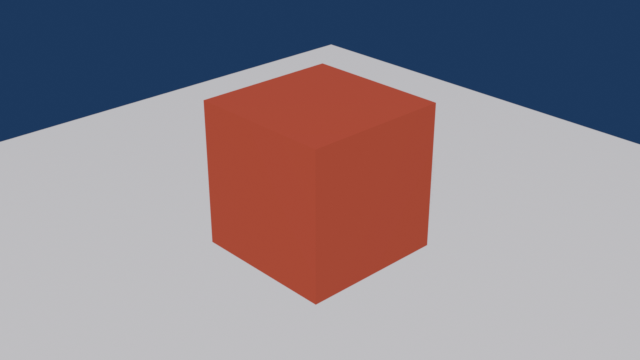
The image produced
This is the render, 640 by 360 pixels. The cube and the ground are lit by the sun, so their pixels are not the colours of their materials: the top of the cube reads #A84A39 for a material set to #c25438, and the ground reads #BEBEC1 for #d8d4cf.