Inkscape
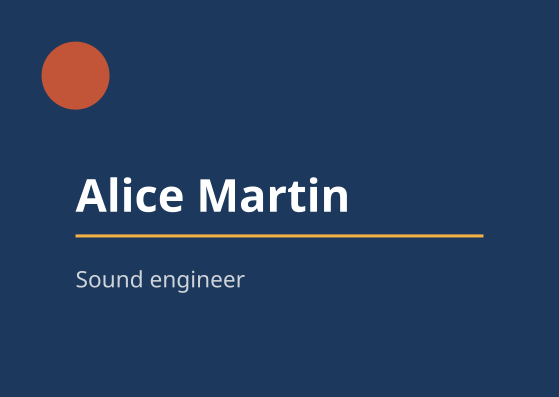
A model drives Inkscape 1.4 through the Hub to lay out a name card on two layers. Inkscape is the one application here with nothing to start: the Hub runs a Python process for each script. This page gives the text, the script, the Hub’s answers and the capture.

On this page
Enable Inkscape
There is no bridge and no window. The Hub looks for /usr/bin/python3, for /usr/bin/inkscape, and for the Inkscape extensions in /usr/share/inkscape/extensions. The whole preparation is one entry in ~/.config/libremodular-mcp/config.toml, after libremodular-mcp init:
[apps.inkscape]
enabled = true
On a clean Debian 13, import inkex also needs python3-tinycss2, which the inkscape package does not pull in: sudo apt install inkscape python3-tinycss2.
get_state on hub listed Inkscape as connected in the cli mode, with the version Inkscape reported:
{
  "app": "hub",
  "app_version": "0.1.0",
  "bridge_version": null,
  "captured_at": "2026-10-21T12:47:13.608Z",
  "connected": true,
  "content_origin": "hub",
  "screenshot": null,
  "state": {
    "modules": [
      {
        "app_version": "1.4",
        "bridge_version": null,
        "connected": true,
        "mode": "cli",
        "name": "inkscape"
      }
    ]
  },
  "warnings": []
}
Text given to the model
Before writing, the model called get_state on inkscape. The state was empty and one warning said no document yet: the working document is created by the first script.
Script written
A model, Claude Sonnet 5.5, wrote this script from the guide and from that state. It is not a script taken from the project’s tests. Two lines come from the guide: the script removes the children of the root first, because the document is kept from one script to the next, and it sets cx, cy and r of the circle one by one, because, as the guide warns, the two arguments of inkex.Circle.new do not make a centre.
import json
import os

import inkex

document = inkex.load_svg(os.environ["LMM_DOCUMENT"])
svg = document.getroot()
for child in list(svg):
    svg.remove(child)
svg.set("width", "148mm")
svg.set("height", "105mm")
svg.set("viewBox", "0 0 148 105")

background = svg.add(inkex.Layer.new("Background"))
panel = inkex.Rectangle.new(0, 0, 148, 105)
panel.style = {"fill": "#1c385c"}
background.add(panel)
disc = inkex.Circle()
disc.set("cx", "20")
disc.set("cy", "20")
disc.set("r", "9")
disc.style = {"fill": "#c25438"}
background.add(disc)
rule = inkex.Rectangle.new(20, 62, 108, 0.8)
rule.style = {"fill": "#f2b344"}
background.add(rule)

texts = svg.add(inkex.Layer.new("Text"))
for content, y, size, colour, weight in [("Alice Martin", 56, 12, "#ffffff", "bold"), ("Sound engineer", 76, 6, "#cfd4da", "normal")]:
    line = inkex.TextElement()
    line.text = content
    line.set("x", "20")
    line.set("y", str(y))
    line.style = {"fill": colour, "font-size": f"{size}px", "font-family": "sans-serif", "font-weight": weight}
    texts.add(line)

document.write(os.environ["LMM_DOCUMENT"])
print("LMM_RESULT: " + json.dumps({"layers": [layer.label for layer in svg.descendants().filter(inkex.Layer)], "elements": len(list(svg.descendants()))}))
The Hub’s answer
{
  "app": "inkscape",
  "duration_ms": 151,
  "error": null,
  "result": {
    "elements": 8,
    "layers": [
      "Background",
      "Text"
    ]
  },
  "status": "ok",
  "stderr": "",
  "stdout": "",
  "truncated": false
}
The script ran in 151 ms: one Python process started and ended. The script printed its result on the last line, after LMM_RESULT: , which is how an Inkscape script hands a value back. get_state then described the working document and returned a capture:
{
  "app": "inkscape",
  "app_version": "1.4",
  "bridge_version": null,
  "captured_at": "2026-10-21T12:47:14.185Z",
  "connected": true,
  "content_origin": "document",
  "screenshot": "$XDG_RUNTIME_DIR/libremodular-mcp/captures/inkscape-20261021T124713832Z.png",
  "state": {
    "element_count": 8,
    "height": "105mm",
    "layers": [
      {
        "id": null,
        "label": "Background"
      },
      {
        "id": null,
        "label": "Text"
      }
    ],
    "width": "148mm"
  },
  "warnings": []
}
The image produced
The capture is the working document exported by inkscape itself, 559 by 397 pixels for a card of 148 by 105 mm. The text is drawn in the sans-serif font of this machine, so another machine draws it in its own. The pixel at the top left of the capture is #1C385C and the one inside the circle is #C25438.